When that system notification surfaces, your primary digital asset stops dead in its tracks. To the public, your brand looks completely broken. Behind the scenes, your automated paid ad campaigns are driving premium traffic directly into a dead end, your lead intake capture paths have frozen, and your organic search authority takes a hit every single hour your origin server throws a 500 status code.
You need to know the code root cause, bypass the bottleneck, and bring your digital infrastructure back online safely.
1.Why Enterprise Environments Break
A Critical WordPress Error is rarely a random glitch. It is the protective reaction of your server’s underlying PHP engine when a script encounters an unhandled fatal condition. Instead of executing broken or unvetted processes that could corrupt your core tables, the application stops entirely.
┌────────────────────────────────────────────────────────┐
│             THE CASCADING CRITICAL FAULT CORRIDOR      │
├────────────────────────────────────────────────────────┤
│ 1. UNCHECKED VENDOR PATC  ► Unvetted script modification│
│ 2. VALUE ROW COLLISION    ► Twin functions fight for RAM│
│ 3. FATAL RUNTIME ABORT    ► Server displays critical bug│
└───────────────────────────┬────────────────────────────┘
                            │  Immediate Operational Stall
                            ▼
┌────────────────────────────────────────────────────────┐
│               TOTAL REVENUE INTERCEPTION               │
│ Dead Forms • Wasted Ad Spend • Broken Conversion Paths │
└────────────────────────────────────────────────────────┘
A. Relational Database & Plugin Row Collisions
When multiple heavy plugins attempt to write data to the exact same option rows simultaneously, or an update introduces conflicting function declarations, the engine main thread locks up. The resulting script collision immediately displays the critical fault screen to your visitors.
B. Unmanaged PHP Memory Exhaustion
Modern corporate sites feature large tracking systems, complex checkout matrices, and heavy API modules . If an unoptimized query loop or a resource-heavy script exceeds the strict memory limit allocated by your hosting infrastructure, the engine aborts the process mid-execution.
C. Corrupted Version Mismatches
Running an advanced core theme update while your server relies on an outdated or unaligned PHP configuration triggers structural syntax mismatches. Because the server cannot parse the modern code layout, it cuts off backend administrative panel access entirely.
2.Three Instant Isolation Steps
If your platform is down right now, use this precise isolation sequence via your secure server control panel or SFTP client to bypass the bottleneck and bring back your administrative access:
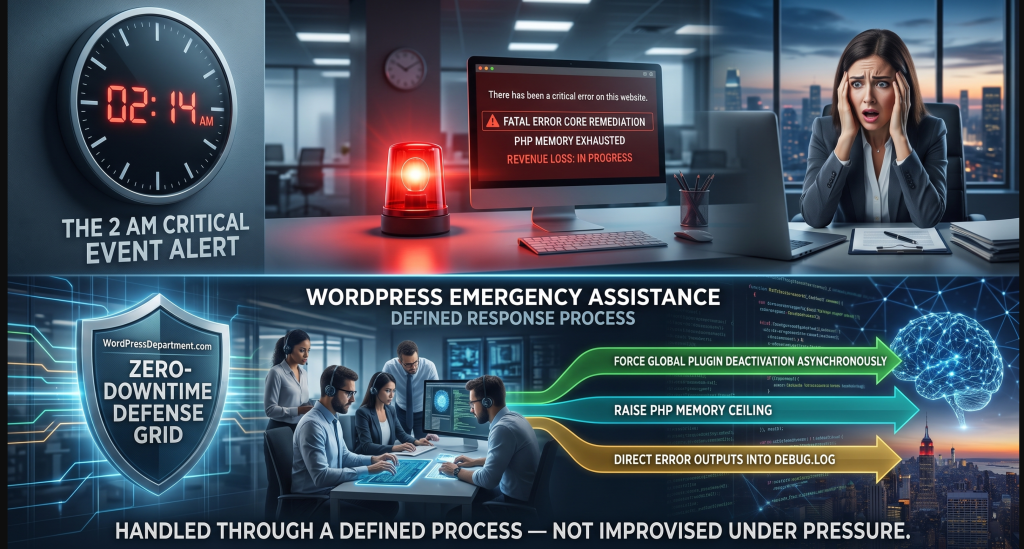
Step 1: Force Global Plugin Deactivation Asynchronously
If a sudden software patch breaks your frontend, you do not need dashboard access to turn it off. Connect directly to your web server using an SFTP client or your host's file manager. Navigate straight to the /wp-content/ directory and rename the plugins folder to plugins-isolated. This action breaks the file path, forcing the core engine to immediately deactivate every active extension. If a plugin conflict caused the crash, your login access will return instantly.
Step 2: Raise Your Server's PHP Processing Ceiling
To address memory exhaustion crashes, you must manually give your application more server resources. Open the secure wp-config.php file located at your root directory and inject these configuration parameters right before the line that says "That's all, stop editing!":
Pillar 3: Upstream Dependency Screening
When third-party plugin updates break your storefront functionality or checkout logic, our process maps the code execution tree to identify the specific file line causing the error. We then deploy a clean server-side component rewrite to safely bypass the broken script.
PHP
define( 'WP_MEMORY_LIMIT', '512M' );
define( 'WP_MAX_MEMORY_LIMIT', '1024M' );
Step 3: Direct Error Outputs into Secure Diagnostic Logs
Stop trying to find code issues blindly. Instruct your system engine to record errors to a secure internal file while hiding technical bugs from your public visitors. Modify your wp-config.php variables to match this setup:
PHP
define( 'WP_DEBUG', true );
define( 'WP_DEBUG_LOG', true );
define( 'WP_DEBUG_DISPLAY', false );
This blocks hackers from seeing internal system paths on the frontend, while saving every code error securely to /wp-content/debug.log so your developers can pinpoint the exact broken file line in seconds.
3. Building Hardened Structural Fallback Arrays
To guarantee your layout and system files never crash your entire server if an external dependency or advanced library asset is missing after a major upgrade, your code loops must use defensive programming.
PHP
<?php
/**
 * Corporate Critical Error Mitigation Governor
 * Programmatically screens and wraps core system integrations inside defensive
 * check loops to eliminate runtime regressions and protect Core Web Vitals.
 *
 * Engineered for Enterprise Resilience - WordPressDepartment.com
 */

if ( ! defined( 'ABSPATH' ) ) {
    exit;
}

add_action( 'wp_enqueue_scripts', 'enforce_hardened_runtime_routing', 10 );

function enforce_hardened_runtime_routing() {
    // 1. Skip system structural filtering inside admin workspace panels
    if ( is_admin() ) {
        return;
    }

    /**
     * 2. Architectural Validation Loop
     * Verify if the active core system includes the modern web asset directory API.
     * If true, execute high-velocity asset mapping. If false, degrade cleanly to fallbacks.
     */
    if ( function_exists( 'wp_get_font_dir' ) ) {
        wp_enqueue_style(
            'enterprise-native-fonts',
            get_template_directory_uri() . '/assets/css/native-font-engine.min.css',
            [],
            '1.0.0'
        );
    } else {
        /**
         * 3. Fallback Containment Strategy
         * Log a non-breaking notation inside your server's secure diagnostic log
         * without throwing a fatal crash or stalling user interactions.
         */
        error_log( '[PERFORMANCE NOTE] Modern asset API unavailable. Deploying backward-compatible fallback styles.' );

        wp_enqueue_style(
            'enterprise-legacy-fallback-fonts',
            get_template_directory_uri() . '/assets/css/legacy-fallback-styles.min.css',
            [],
            '1.0.0'
        );
    }
}
4. The ROI of Process-Driven Support
Treating website operations as an engineered utility backed by a dedicated team of specialists turns your platform safety into a powerful asset for long-term digital growth.
Sustained Global Search Authority
Search algorithms use automated crawlers to check your site around the clock. If a crawler encounters a critical 500 server error multiple times while your site is broken, search engines will quickly demote your domain visibility. Swift remediation protects your keywords.
Maximized Advertising Spend Efficiency
Eliminating mobile page loading lag ensures that when a prospect clicks a campaign link, your page responds instantly, preventing bounce rates and reducing customer acquisition costs.
Absolute Platform Sovereignty
Establishing complete control over your technology stack ensures your business remains entirely free from closed SaaS builder restrictions, transactional revenue taxes, and unexpected subscription fee increases.
Audit your platform’s automated update settings, identify hidden background memory leaks, and learn how to build a zero-downtime sandbox testing pipeline.
Frequently Asked Questions
Schedule an Emergency Infrastructure Review
To understand the company behind these solutions, you can explore Staxtar’s official platform for more technical and business details.