In the hyper-connected digital landscape of 2026, content management systems have moved past the era of standard static layouts and fragmented external plugins. For enterprise brands, digital agencies, and high-concurrency WooCommerce setups, your core platform can no longer act as a passive database. It must operate as an intelligent, high-velocity operational foundation.
The latest architectural evolution of WordPress marks a defining boundary in the web ecosystem. This is not a surface-level collection of minor feature additions; it is a profound rewrite of how the application processes data, renders layouts, and communicates with machine learning models.
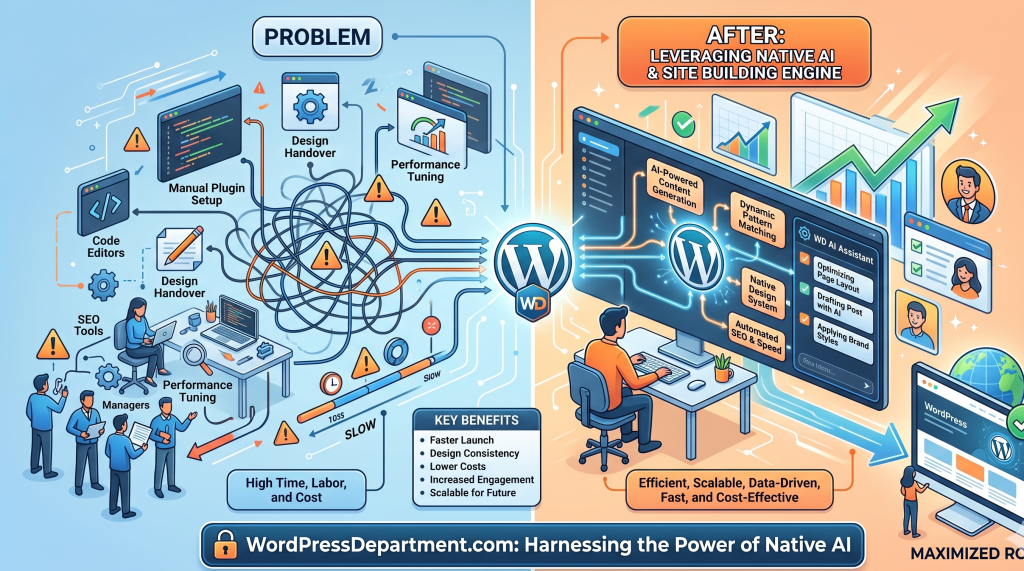
By introducing a decoupling framework that features Native AI Infrastructure, refined core block tools, and highly optimized developer primitives, WordPress has established true Architectural Sovereignty. This upgrade fundamentally changes your digital workflow, systematically reducing technical debt while maximizing your platform’s long-term Digital ROI.
At WordPressDepartment.com, we analyze technical iterations through a strict lens of security, performance engineering, and conversion optimization. This executive briefing breaks down the core structural updates, the developer APIs, and the step-by-step strategies required to harness this high-performance framework. https://wpdepartment.com/start-project/
1. The Four-Tier Engine
This technical release reorganizes WordPress core operations into four distinct architectural layers designed to optimize performance and elevate the creation experience. https://wpdepartment.com/custom-wordpress-development-engineering/
┌────────────────────────────────────────────────────────┐
│               NATIVE AI INFRASTRUCTURE                 │
│ Foundational Core Layer • AI Assistants • LLM Hooks    │
└───────────────────────────┬────────────────────────────┘
                            ▼
┌────────────────────────────────────────────────────────┐
│                ENHANCED SITE BUILDING                  │
│ Fonts Page Manager • Breadcrumbs Block • Nav Control   │
└───────────────────────────┬────────────────────────────┘
                            ▼
┌────────────────────────────────────────────────────────┐
│                 ADMIN UI REFINEMENTS                   │
│ Deep Blue Palette • Command Palette • Smooth Anim Loops│
└───────────────────────────┬────────────────────────────┘
                            ▼
┌────────────────────────────────────────────────────────┐
│                 DEVELOPER UTILITY TOOLS                │
│ PHP-Only Blocks • Always-Iframed Editor • UI Primitives│
└────────────────────────────────────────────────────────┘
A. Native AI Infrastructure
The defining element of this release is the integration of core Native AI Infrastructure. This structural update establishes the foundational groundwork required for native AI integration and assistants directly inside the core application root. By preparing core processing tracks for contextual machine learning payloads, WordPress allows internal systems to communicate smoothly with semantic language models and localized execution hooks without the performance lag associated with unoptimized external scripts. https://wpdepartment.com/wordpress-emergency-assistance/ for https://wpdepartment.com/wordpress-hack-removal/
B. Enhanced Site Building
The layout engineering pipeline receives an immediate injection of semantic efficiency, delivering an Enhanced Site Building environment. This layer brings highly requested block enhancements and streamlined management tools to the core interface:
- Dedicated Fonts Page: A centralized system workspace to install, register, and manage custom typography assets easily without writing manual enqueue scripts or relying on resource-heavy styling extensions.
- Automatic Breadcrumbs Block: An upgraded structural block tool that automatically reads your site’s categorization matrix to display accurate, schema-ready hierarchy lines for users and search engine crawlers.
- Streamlined Site Navigation: Fully upgraded navigation tools built to minimize layout shifts and make editing deep menu trees incredibly smooth.
C. Admin UI Refinements
The application backend layout has been modernized through serious Admin UI Refinements. The administrative canvas shifts to a sleek, deep blue admin color scheme that lowers visual strain during extended management sessions. This aesthetic upgrade is paired with smoother navigation animations across workspace screens and a new Command Palette shortcut located right in the admin bar for instant, keyboard-driven tool switching. https://wpdepartment.com/custom-wordpress-development-engineering/
D. Developer Tools Optimization
For technical engineering wings, the release introduces refined Developer Tools focused on performance stability and custom element control:
- PHP-Only Block Registration Eliminates the mandatory JavaScript configuration boilerplate for basic block variations, drastically cutting down project asset weight.
- Always-Iframed Post Editor Forces the content creation canvas to load inside a secure, isolated iframe, ensuring consistent user interface styling entirely isolated from conflicting third-party plugin stylesheets.
- Standardized UI Primitives Updated global application objects (such as tooltips, dropdowns, and modals) configured for lightweight rendering and accessible interaction.
2. Squeezing Out Technical Debt
https://wpdepartment.com/wordpress-seo-and-speed-optimization-service/#form
The Fonts Page Performance Breakthrough
When a design uses unoptimized custom web fonts, it frequently triggers heavy layout lag known as Cumulative Layout Shift (CLS) as text styles snap into place. The new centralized Fonts Page resolves this by handling font assets locally right from your server or edge network. This strips away slow external calls, allowing your pages to comfortably hit Google’s strict 1.2-second Largest Contentful Paint (LCP) targets.
https://wpdepartment.com/custom-wordpress-development-engineering/#technical-stack
Semantic Breadcrumbs & Crawl Budgets
3. Registering Optimized PHP Blocks
To illustrate the technical simplicity brought by the new developer utility suite, our enterprise engineers lean heavily into the new PHP-only block registration features. Below is a production code sample showing how to cleanly register a custom, server-rendered element without loading heavy JavaScript bundles into the workspace backend:
PHP
<?php
/**
 * Enterprise Server-Rendered Component Registry
 * Leverages new PHP-only block structures to eliminate asset weight.
 *
 * Engineered for Enterprise Scale - WordPressDepartment.com
 */

if ( ! defined( 'ABSPATH' ) ) {
    exit;
}

add_action( 'init', 'register_enterprise_sovereign_block_asset' );

function register_enterprise_sovereign_block_asset() {
    // 1. Check if the modern PHP-only registration interface exists
    if ( ! function_exists( 'register_block_type_from_metadata' ) ) {
        return;
    }

    /**
     * 2. Register the Enterprise Component directly via server arrays.
     * Bypasses complex build requirements, deploying lean, schema-ready HTML
     * directly into the always-iframed post editor canvas.
     */
    register_block_type( 'enterprise-infrastructure/native-summary', [
        'title'           => __( 'Native Infrastructure Summary', 'enterprise-core' ),
        'category'        => 'design',
        'icon'            => 'admin-network',
        'description'     => __( 'High-performance semantic block engineered for AI data structures.', 'enterprise-core' ),
        'supports'        => [
            'html'  => false,
            'color' => true,
            'align' => [ 'wide', 'full' ]
        ],
        'render_callback' => 'render_enterprise_sovereign_block_markup'
    ]);
}

/**
 * Handles the high-velocity semantic frontend presentation loop
 */
function render_enterprise_sovereign_block_markup( $block_attributes, $block_content ) {
    // Inject automatic tracking schema and render structural layout elements
    $output_buffer = '<div class="wp-block-enterprise-native-summary structural-node-padded">';
    $output_buffer .= '<p class="identity-lead-text">' . esc_html__( 'System Architecture Verified Core Optimal.', 'enterprise-core' ) . '</p>';
    $output_buffer .= '</div>';

    return $output_buffer;
}
4. The ROI of Core Infrastructure
Transitioning your enterprise digital presence to a platform that utilizes these native performance tracks transforms web infrastructure from a routine maintenance cost into your highest-leverage conversion system.
Sustained Search Authority
Aligning your site layouts with native semantic components protects your organic search positioning from platform algorithm updates.
Streamlined Team Content Lifecycles
Utilizing tools like the Command Palette shortcut and the always-iframed post editor ensures your marketing teams publish and scale resources with zero interface formatting conflicts.
Future-Proof Asset Protection
Building your application layer on top of Native AI Infrastructure guarantees your corporate web setup remains fully prepared to handle the demands of automated digital search assistants.
Download the 2026 Core Infrastructure Migration Roadmap
Audit your platform’s operational readiness, map out custom block refactoring plans, and discover how to transition to native font management architectures.
Frequently Asked Questions
Future-Proof Your Core Infrastructure: Schedule an Audit
Your digital storefront should be an intelligent, high-velocity conversion pipeline, not a collection of fragmented plugins hiding legacy server lag. Partner with our senior development and platform optimization architects to eliminate technical debt, integrate your workflows with modern native systems, and maximize your brand’s digital growth.